Test & publish
Version history and rollback
Every change to a function’s rule is saved as a version. Compare any two versions and restore an older one in one click.
FunctionFlow keeps a version every time a function’s rule changes, so you can see what changed and go back if something goes wrong.
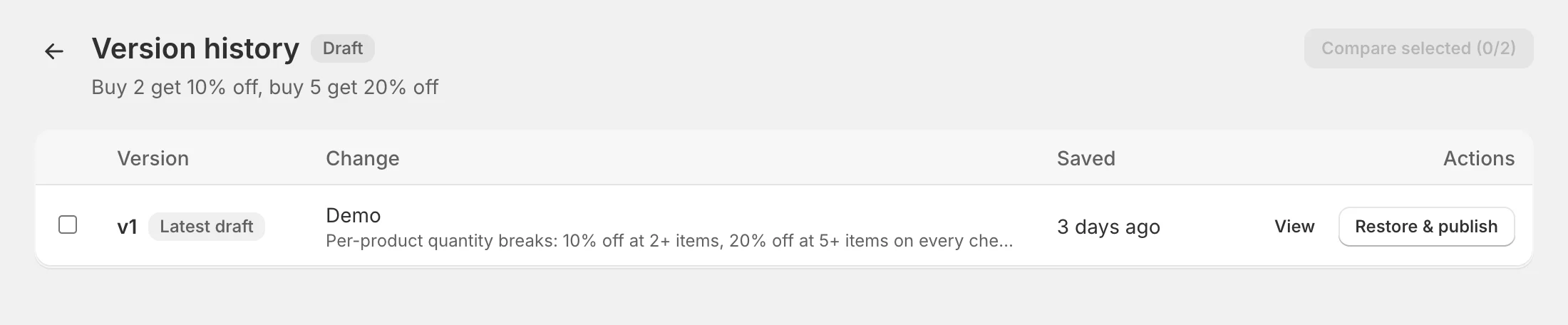
Open it with History in the builder header, or Version history in a function’s menu on the Functions page.
What creates a version
A new version is saved when:
- you create a function (v1),
- you save a change to its conditions or actions,
- you duplicate or import it, or restore an older version.
Saving with no change to the rule doesn’t create a version, and neither do changes to the title, note, dates, discount settings or test mode. Versions never change once saved.
Read the list
- Version — v1, v2… The published version is marked Live; the newest unpublished version is marked Latest draft.
- Change — the version note (for example Rollback to v2) and a one-line summary of the rule.
- Saved — when and by whom.
Compare two versions
Tick two versions and click Compare selected. You’ll see the rule line by line: added lines in green with +, removed lines in red with −.
View a version
View shows the version’s summary and the exact configuration sent to Shopify.
Restore an older version
Click Restore & publish on the version you want and confirm. FunctionFlow saves it as a new version — nothing is deleted — and publishes it to your store right away, keeping the function’s current test mode, dates and discount settings. You can always roll forward again the same way.
Note: Restoring publishes immediately. To look at an old version without publishing, use View — or Compare it with the current one.