Function types
Checkout rules
Stop checkout with a clear message when a cart breaks your rules: quantity limits, restricted products, PO Boxes and ZIP codes you can’t serve.
Checkout rules — validation functions — block checkout and show your message when a cart doesn’t meet your rules. In Shopify they’re listed under Settings → Checkout.
Actions
Block checkout
Blocks checkout whenever the When conditions match and shows Error message shown at checkout. Use it for addresses, regions or carts you can’t accept — for example Address is a PO Box is true → We can’t ship to PO Boxes. Please use a street address.
Important: With no conditions, Block checkout blocks every checkout. Always add conditions first.
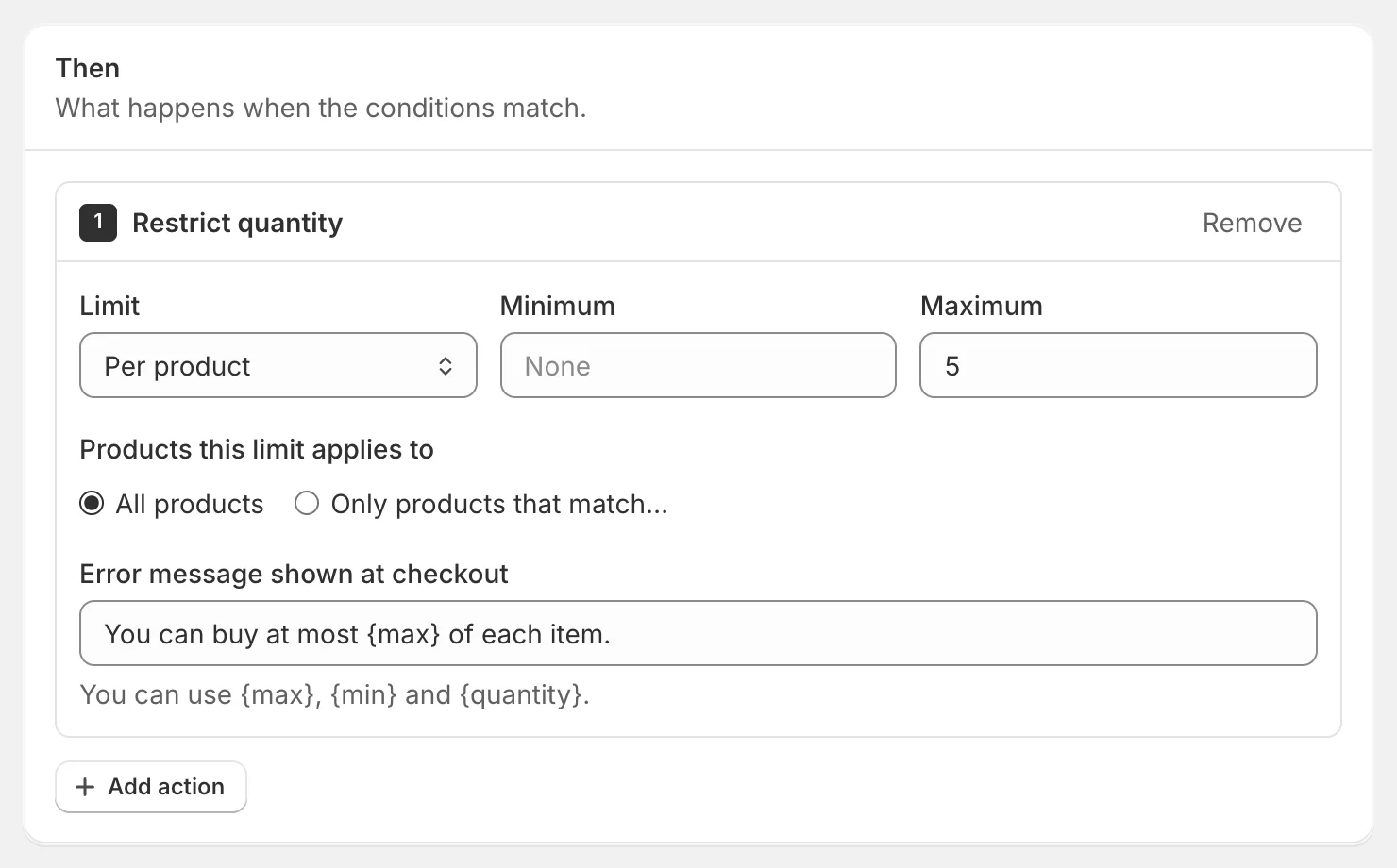
Restrict quantity
Limits how many units can be bought:
- Limit — Per product checks each cart item (each variant on its own); Across the whole cart adds up all matching items.
- Minimum and Maximum — leave one empty if you only need the other.
- Products this limit applies to — all products, or only those matching a filter.
- Message — you can use
{max},{min}and{quantity}: You can buy at most {max} of each item.
Restrict products
Blocks checkout when the cart contains products matching Restricted products — for example products tagged wholesale-only. Add conditions to decide who the restriction applies to, such as Customer tags has none of wholesale.
Examples
| Goal | When | Then |
|---|---|---|
| Max 5 per product | — | Restrict quantity → per product, maximum 5 |
| Minimum order | Cart total is less than 50 | Block checkout → Orders start at $50. |
| No PO Boxes | Address is a PO Box is true | Block checkout |
| Blocked ZIP codes | ZIP / postal code is any of 96799, 96960 | Block checkout → Sorry, we can’t deliver to this ZIP code. |
| Sign-in required | Customer is logged in is false | Block checkout → Please sign in to complete your order. |
| Wholesale-only products | Customer tags has none of wholesale | Restrict products → tagged wholesale-only |
Write helpful messages
Customers see your message at checkout and need to know how to fix the problem. Say what’s wrong and what to do — “We can’t ship to PO Boxes. Please use a street address.” — in up to 250 characters.
If a validation can’t run
In Settings, Block checkout if a validation function errors decides what happens in the rare case a validation fails to run. Off (recommended) lets checkout continue; On blocks it until the function runs successfully. The setting is applied to each checkout rule when it’s published, so publish your rules again after changing it.
Things to know
- Checkout rules don’t change orders, so they don’t appear in Analytics.
- Shopify allows up to 25 checkout validations per store.
- Address conditions only apply once the customer has entered an address.