Manage & measure
Manage your functions
Find, filter and switch functions on and off from the Functions page, and duplicate, export, archive or delete them.
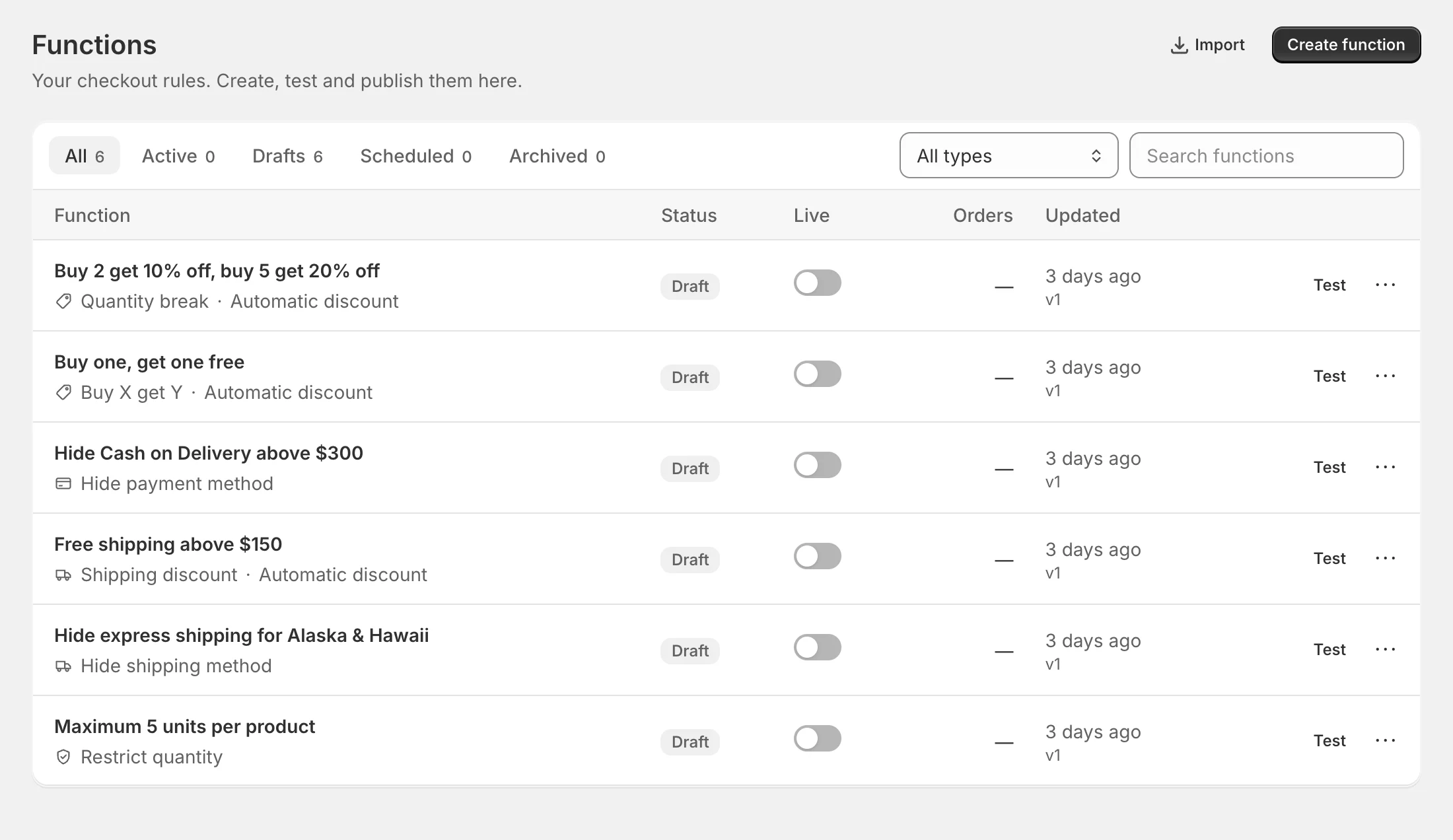
The Functions page lists every function in your store, built visually, from a template, with AI or in code.
Find a function
- Tabs — All (everything except archived), Active, Drafts, Scheduled and Archived, each with a count.
- All types — show only Discounts, Shipping, Payment methods or Checkout rules. With a type selected, a note reminds you of Shopify’s limit for it.
- Search functions — searches titles.
What each row shows
- Function — the title and, underneath, what it does (Quantity break, Hide payment method, Custom code…), whether it’s an Automatic discount or uses a Code, and ✦ AI if it was drafted by AI.
- Status — Draft, Active, Scheduled, Archived or Publish failed, plus badges such as Test mode or Unpublished changes. See statuses.
- Live — a switch to publish or unpublish without opening the function.
- Orders — orders the function has influenced (see Analytics).
- Updated — when it last changed, and the current version.
Click a row to open it in the builder (or the code editor).
Note: Switching Live on publishes straight away with the function’s saved test mode setting — it doesn’t show the publish dialog. To publish in test mode for the first time, use Publish… in the builder.
Row actions
Test opens the Test page. The ⋯ menu has:
- Edit and Test
- Duplicate — a draft copy called Copy of …
- Version history — see Version history
- Export — download a
.functionflow.jsonfile - Archive — remove it from Shopify and keep its history (archived functions show Restore as draft instead)
- Delete — remove it from FunctionFlow and Shopify
Import, at the top of the page, adds an exported file as a new draft.
Plan limits
Your plan includes a number of functions. Every function that isn’t archived counts — drafts included — so archive the ones you no longer need. If you reach the limit you’ll see Your plan includes N functions. Upgrade or archive a function to add more. See Plans and billing.
Separately, Shopify limits how many functions of each kind can be active at once: 25 app discounts, 25 delivery customizations, 25 payment customizations and 25 checkout validations.
Home at a glance
Home summarises your functions too: totals and what’s active, counts per kind in Your functions, how much of your plan you’re using in Current plan, and the latest changes in Recent activity — published, switched to test mode, went live on schedule and so on.