Function types
Discounts
Every discount you can build: percentage, fixed amount, Buy X Get Y, bundles, tiers, quantity breaks, gifts and shipping discounts.
Discount functions create app discounts in your Shopify store. They appear under Discounts in Shopify admin, and customers see the function’s title at checkout next to the discount.
Discount actions
Open the Then card and click Add action:
| Action | What it does | Key options |
|---|---|---|
| Percentage off | A percentage off the order or each matching product | Percentage (0–100) · applies to Order subtotal or Each matching product · eligible products |
| Fixed amount off | An amount off the order or matching products | Amount · applies to order or products · Apply the amount to every unit (not once per line) |
| Buy X get Y | Buy a number of items, get others discounted or free | Customer buys · Customer gets · discount on the items they get (100% = free) · which items count · Maximum uses per order |
| Bundle | A discount when the cart has a set combination of items | Bundle items, each with a quantity and products · Percentage off the bundle items, Fixed amount off each bundle or Fixed price for each bundle |
| Tiered / volume discount | A bigger discount at each subtotal or quantity tier | Tiers based on Cart subtotal or Total quantity of matching products · discount applies to order or products |
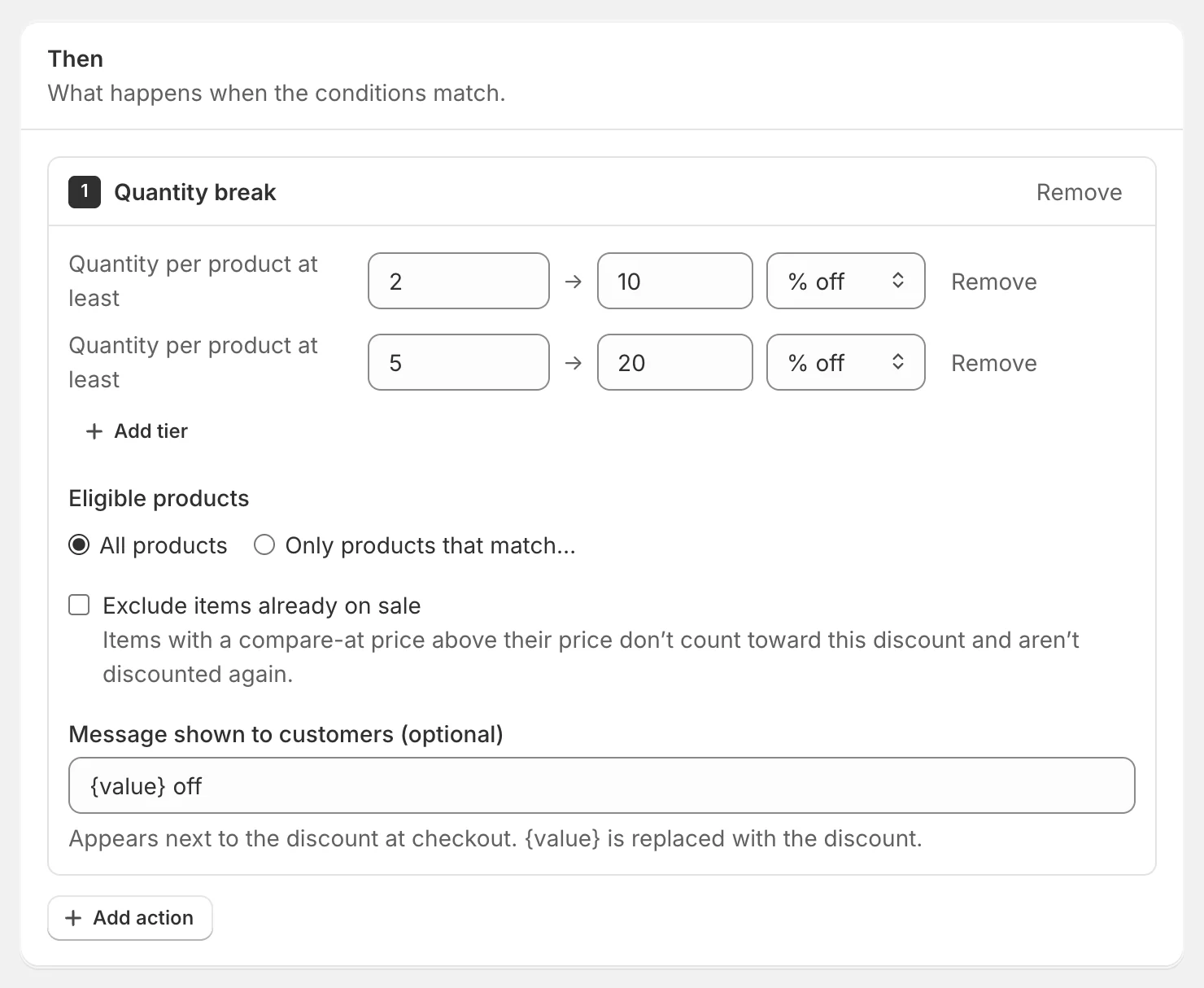
| Quantity break | A discount per product based on how many of it are in the cart | Tiers by Quantity per product at least · eligible products |
| Mixed product discount | Different discounts for different products | Product groups, each with % or amount off — each product gets the discount of the first group it matches |
| Tiered gifts | Free or discounted gift products at each tier | Tiers by subtotal or quantity · gift products and how many units |
| Shipping discount | Free or discounted shipping | Free shipping, Percentage off shipping or Fixed amount off shipping · optionally only some shipping methods |
Choosing products
Most actions have an Eligible products choice: All products or Only products that match…, where you build a filter such as Product tags has any of summer or pick products and collections. Bundles, mixed discounts and gifts always ask which products they use.
Exclude items already on sale
Product discounts can skip sale items. Tick Exclude items already on sale and items with a compare-at price above their price neither count toward the discount nor get discounted again.
Message
Message shown to customers (optional) appears next to the discount at checkout. {value} is replaced with the discount: {value} off with our spring sale becomes 20% off with our spring sale. For fixed amounts, {value} is the number without a currency symbol, so write ${value} off if you want one.
A few things to know
- Buy X get Y gives the cheapest qualifying items first. If the “get” items come from the same products as the “buy” items, each set needs buy + get units.
- Quantity breaks check each cart line separately. An amount-off tier takes the amount off each unit.
- Tiers — the highest tier the cart reaches applies.
- Tiered gifts — Shopify Functions can’t add products to the cart. The gift is discounted once the customer adds it, so tell customers about the gift on your store. Exclude gift products from the products that count toward the tier.
- Order discounts — when several order-level discounts from one function apply, Shopify keeps the largest. Product discounts all apply.
- A shipping discount can’t be in the same function as product or order discounts — create one function for each.
Discount settings
The Discount settings card in the sidebar controls how Shopify applies the discount.
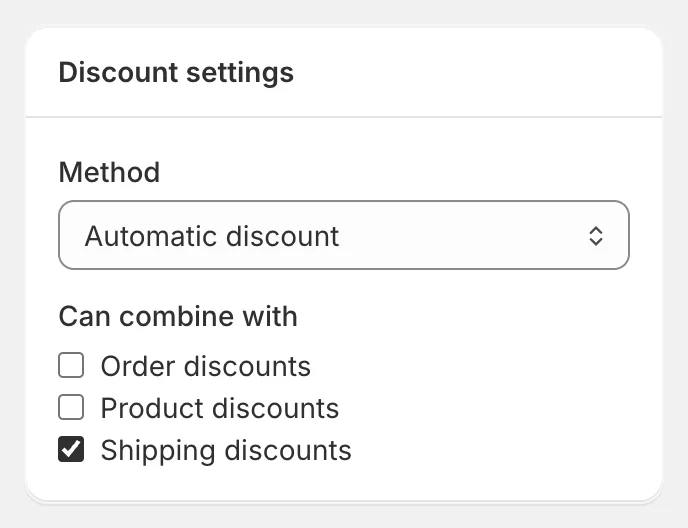
- Method — Automatic discount applies by itself when the conditions match. Discount code applies only when the customer enters the code you set (letters, numbers, dashes and underscores; it’s saved in capitals).
- Can combine with — tick Order discounts, Product discounts and/or Shipping discounts to let this discount stack with others of those kinds. New discounts start with the defaults from Settings.
Note: Changes to the title, discount settings or dates of a live discount reach Shopify when you click Save & publish.
Limits
- Shopify allows up to 25 active app discounts per store, and free and discounted shipping functions count toward them.
- Each function can have up to 20 actions; tiered actions up to 20 tiers; bundles up to 10 items.
Ideas
- VIP pricing: Customer tags has any of VIP → 15% off the order.
- Spend more, save more: a tiered discount at 100, 250 and 500.
- Happy hour: see Happy hours and time-based rules.
- Full-price only: 15% off products with Exclude items already on sale.
- Bundle: any 3 candles for 15% off — one bundle item with quantity 3 and a candle tag filter.
Before publishing, test your discount on a sample cart — the result lists exactly which items were discounted.