Build functions
Conditions: when a function applies
Combine conditions with ALL or ANY, group and invert them, check items in the cart, and understand exactly how each condition is matched at checkout.
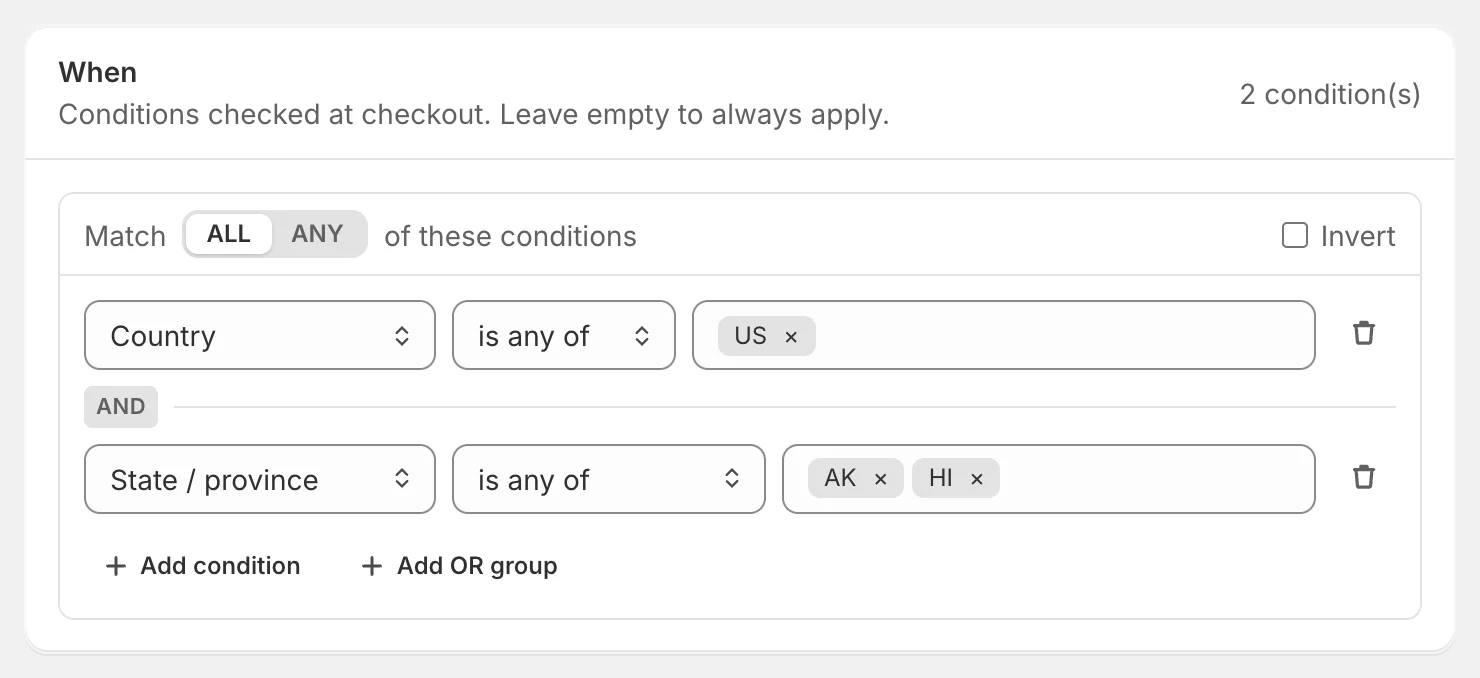
Conditions decide when a function’s actions run. They live in the When card of the builder. With no conditions, the function applies to every checkout.
Add a condition
- Click Add condition.
- Click Choose a condition… and pick what to check. Type to search, use the arrow keys to move and press Enter to choose.
- Pick an operator, such as is at least, has any of or is between.
- Enter the value.
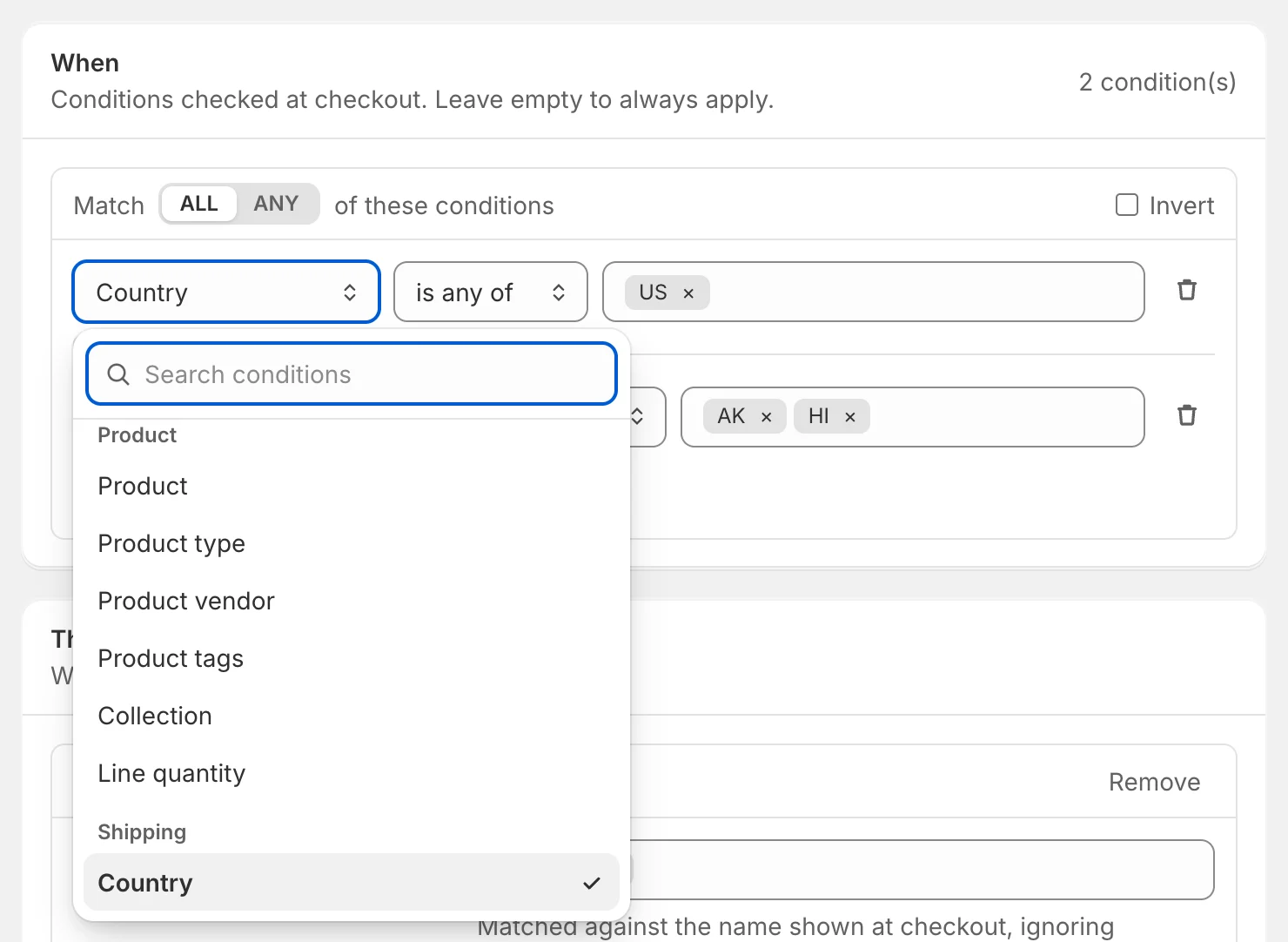
The picker only lists conditions that work for the kind of function you’re building — Shopify gives each kind different cart data. The full list is in the condition reference.
Under each condition you may see a short hint, such as how Cart total is calculated. To remove a condition, click the bin icon.
ALL, ANY and groups
The toggle at the top of the card sets how conditions combine:
- ALL — every condition must match (they’re joined with AND).
- ANY — at least one condition must match (joined with OR).
To mix the two, add a group. In an ALL group, Add OR group adds a nested group whose conditions are joined with OR — for example the customer is tagged VIP and (the cart total is over $100 or the cart has 3+ items). In an ANY group the button is Add AND group. Groups can be nested up to four levels deep.
Invert
Tick Invert to run the actions only when a group does not match. The header changes from Match to Unless, and the summary reads not (…). For example, invert Customer tags has any of wholesale to apply a rule to everyone except wholesale customers.
Operators and values
The operators depend on what you’re checking:
| You’re checking | Operators |
|---|---|
| Amounts and numbers (cart total, quantity…) | is greater than, is at least, is less than, is at most, is, is not, is between |
| Weight | is greater than, is at least, is less than, is at most, is between |
| Text (product type, ZIP, city…) | is, is not, is any of, is none of, contains, does not contain, starts with, ends with, is empty, is not empty |
| Countries | is any of, is none of |
| Tags | has any of, has all of, has none of |
| Collections | has any of, has none of |
| Products and variants | is any of, is none of |
| Yes/no (logged in, PO Box, on sale…) | is true, is false |
| Time of day | is between |
| Day of the week | is, is not |
And the value box changes to match:
- Amounts show your store’s currency; weights have a unit picker (g, kg, lb, oz).
- Lists (tags, countries, ZIP codes, names) take several values: type one and press Enter or a comma. Paste a comma- or line-separated list to add many at once.
- Products, variants and collections open Shopify’s product picker so you can choose items from your store.
- Time of day has two time fields; Day of the week has seven day buttons, Monday first.
- Cart attribute and Line property ask for the attribute or property name first, then its value.
Conditions about items in the cart
Some conditions look at the products in the cart rather than the cart as a whole.
On any, every or no item
Product conditions such as Product tags, Product type, Collection or Line quantity have an extra choice:
- on any item (default) — at least one cart item matches.
- on every item — all items match (and the cart isn’t empty).
- on no item — no item matches.
So Product tags has any of preorder on every item means the cart only contains pre-order products.
Item conditions with a product filter
Cart has items, Quantity of items and Subtotal of items look at a set of products you choose. Under the condition, pick Any product or Only products that match… and build a small filter, for example Product tags has any of candle. Then Quantity of items is at least 3 means “at least 3 candles”.
Tip: To say “the cart doesn’t contain X”, use Cart has items → doesn’t have these items with a filter for X. It checks the whole cart, which is usually what you mean.
How conditions are matched at checkout
- Upper and lower case are ignored for text, tags, names and codes, and extra spaces are trimmed.
- Tags must match a whole tag. vip matches the tag VIP but not VIP-gold.
- ZIP codes ignore spaces, so SW1A 1AA and SW1A1AA are the same.
- Several values mean “any of them”. Product type contains shirt, tee matches either.
- Missing information never matches, except with negative operators. If the address isn’t entered yet, Country is any of US is false, while Country is none of US is true.
- Guests have no tags, 0 orders and 0 spent. Use Customer is logged in to target only signed-in customers.
- PO Box detection looks for PO Box, P.O. Box, Post Office Box or POB in the first address line.
- Cart total is the subtotal before discounts in discount functions, and the cart total in payment, shipping and checkout rules.
- Times and days use your store’s time zone. See Happy hours and time-based rules.
Limits
- One cart attribute name, one line property name and one time-of-day window per function.
- Up to 100 different customer tags, product tags or collections per function.
- A function’s whole configuration can be at most 10 KB — the meter in What it does shows how close you are.
If something isn’t allowed, the builder explains why right under the condition.
Check your logic
Read the What it does summary after every change, then run the quick test with a cart that should match and one that shouldn’t. The test’s Why section shows each condition with ✓ or ✕ and the value the function saw.